Identify ways for consumers to be able to unlink their DICK'S Scorecard from their Nike Membership account within the Linked Accounts Settings on Nike.com and the DICK'S Sporting Goods mobile App.
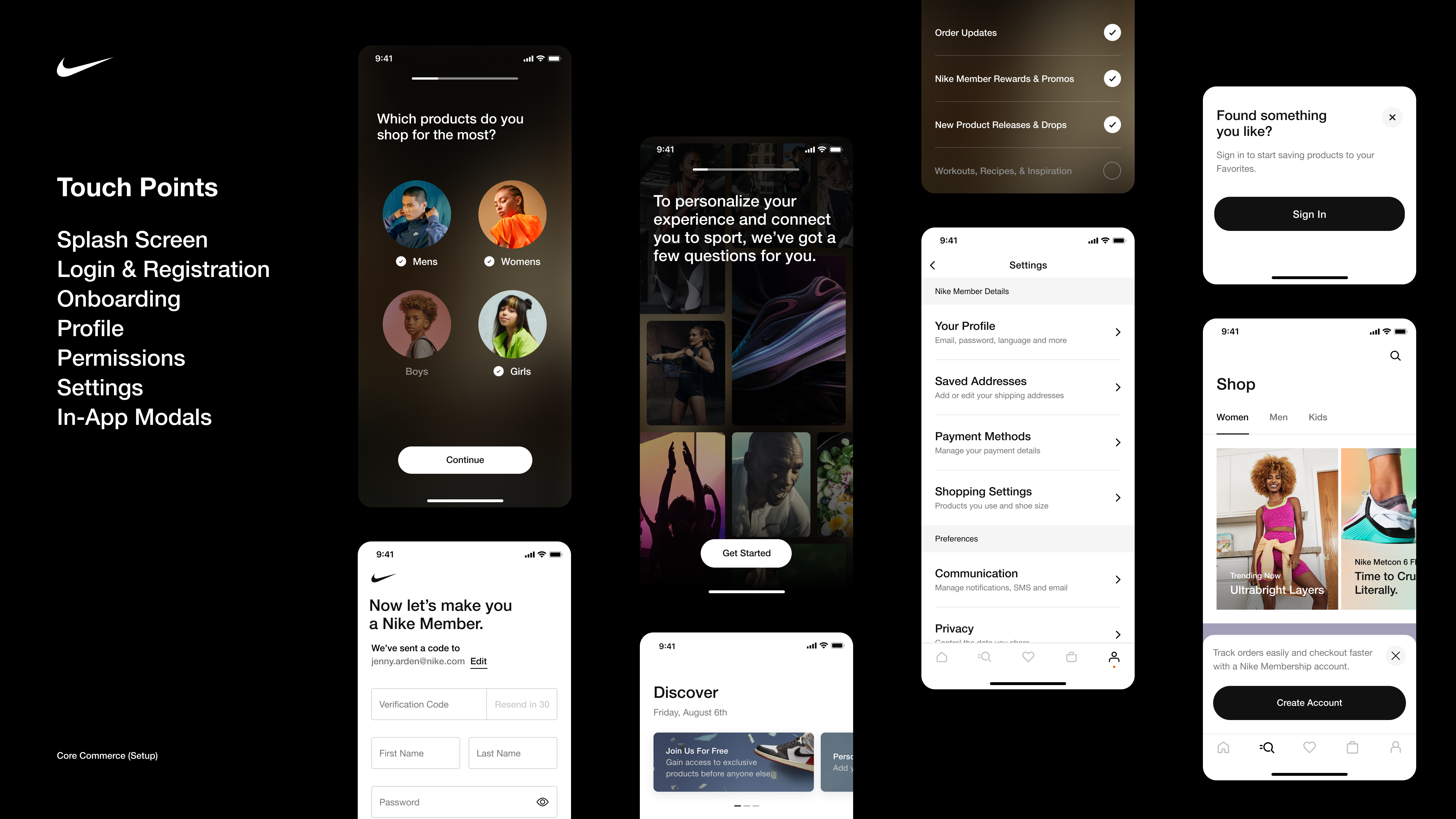
Nike's Core Commerce, Setup team is responsible for designing the setup experiences for Nike Members from account creation, onboarding, and profile customization. We focus on identifying key moments to enable services and permissions that would allow Members to take full advantage of our digital offerings and exclusive membership benefits.
02 • Account Linking
Nike Member Partnerships Team believes Account Linking is the technical capability that will take the Nike & DICK'S Sporting Goods partnership to the next level. Account Linking is a loyalty program feature that allows users to link Apple, Google, Spotify, Fortnite, ESPN, etc (Nike Partners) to their Nike Membership account to gain immediate benefits, future rewards, improved personalized experiences, & recommendations.
Enhanced account linking can move past Nike's traditional retail offerings, such as offering discount codes, and into an expanded approach to reaching new consumers. The main goal was to create the experience for users that want to disconnect from a Nike Partner on their Nike Membership Account.
Problem Space ―
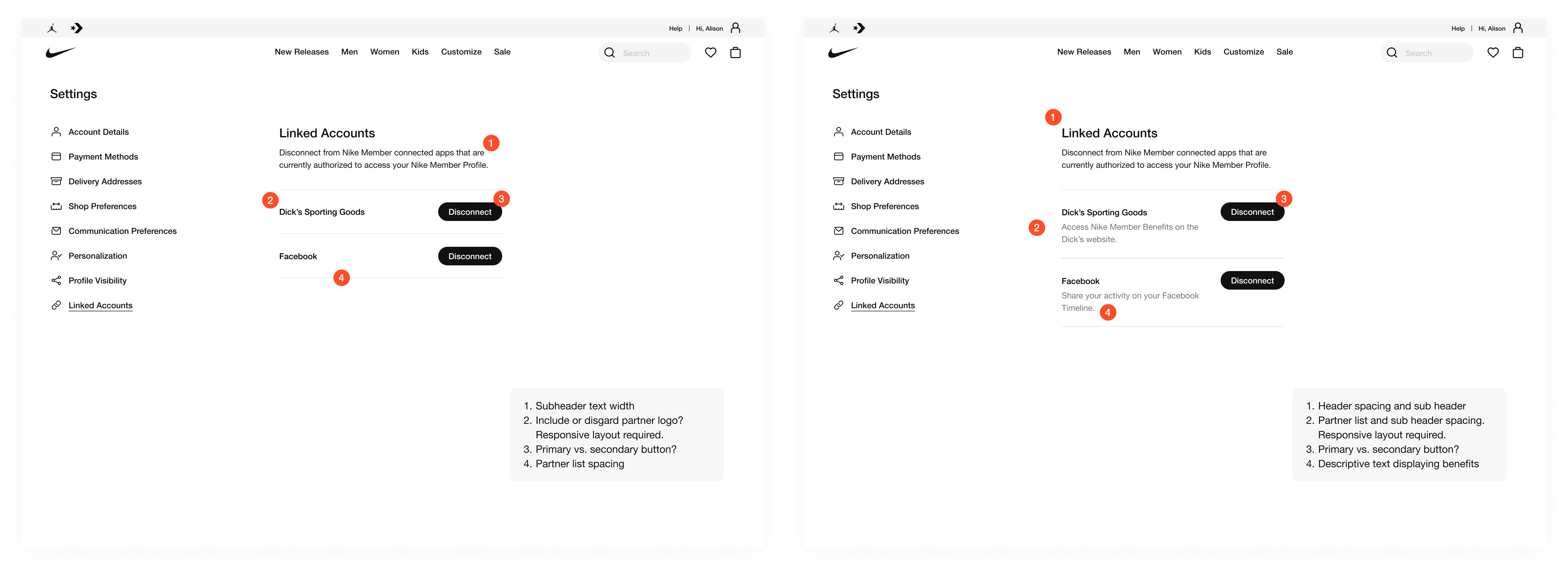
How might we optimize the visibility of partner names in Linked Accounts? Should we eliminate descriptive copy or include descriptions to remind users the benefits of being connected? Are there other details that would be valuable to inform users?
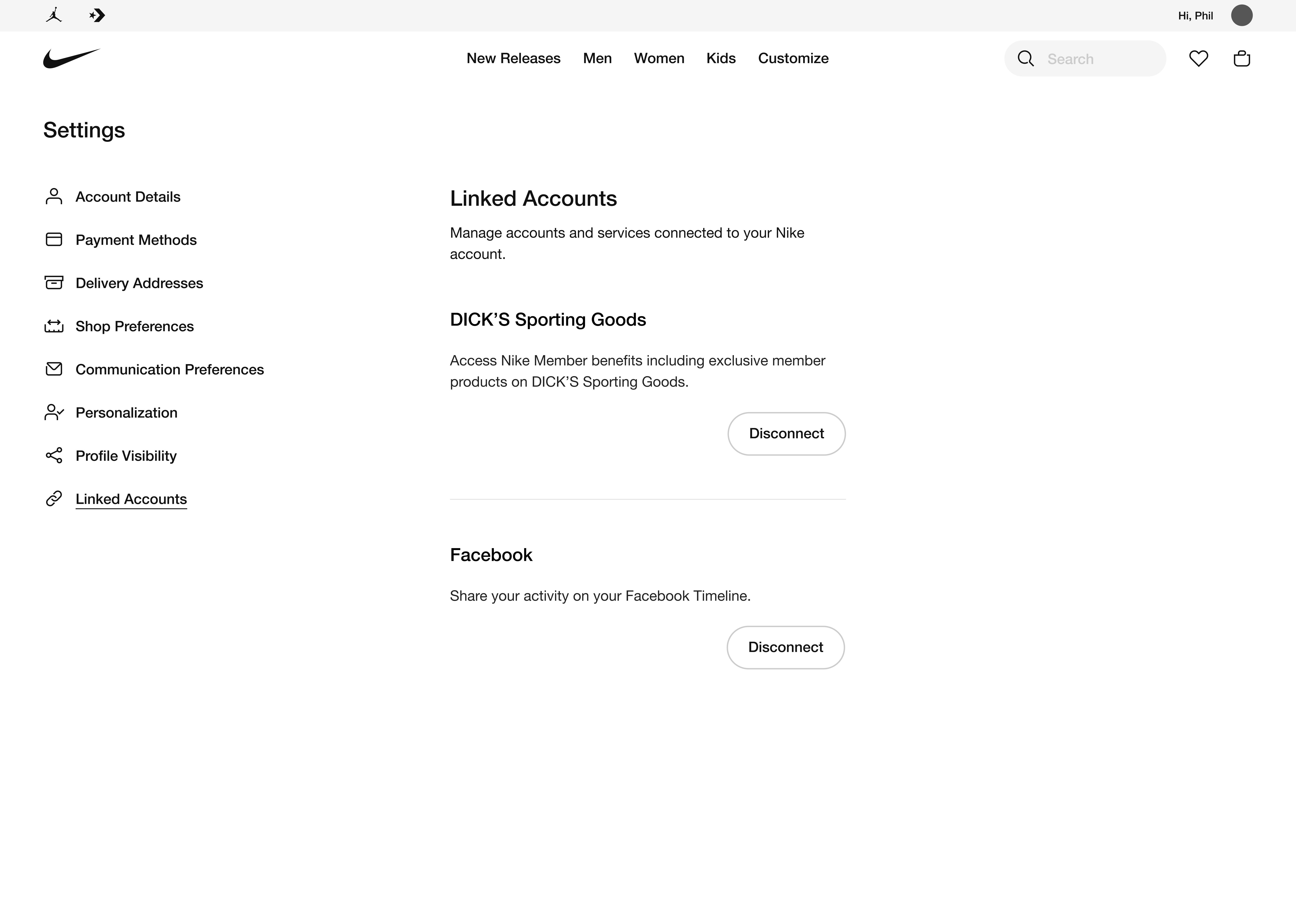
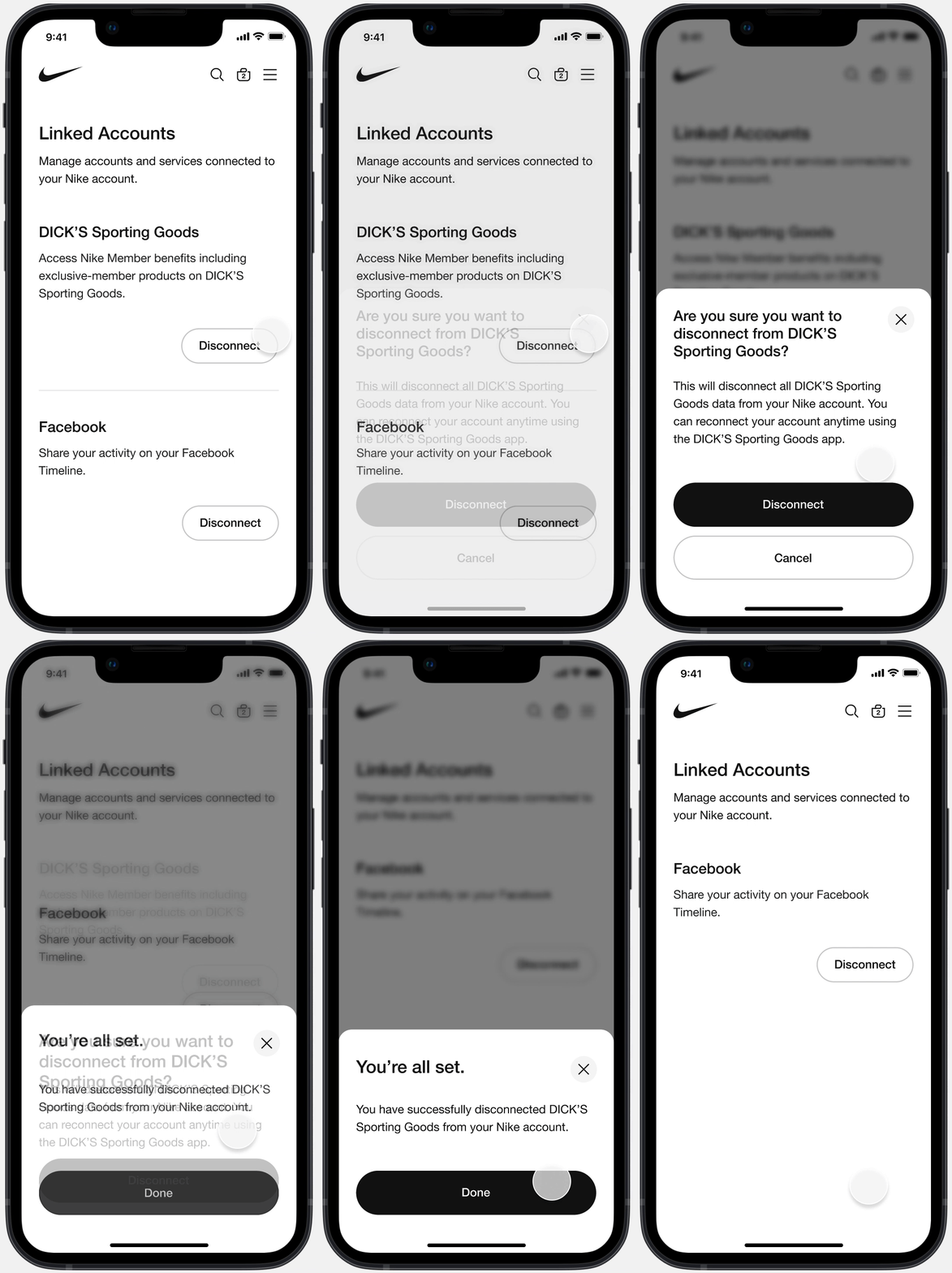
Managing “Linked Accounts” section for displaying all partners and services connected to the user’s membership account within Settings on Nike.com, user will be able to view their benefits, rewards, and other exclusive offers.
Linked Accounts Settings ―
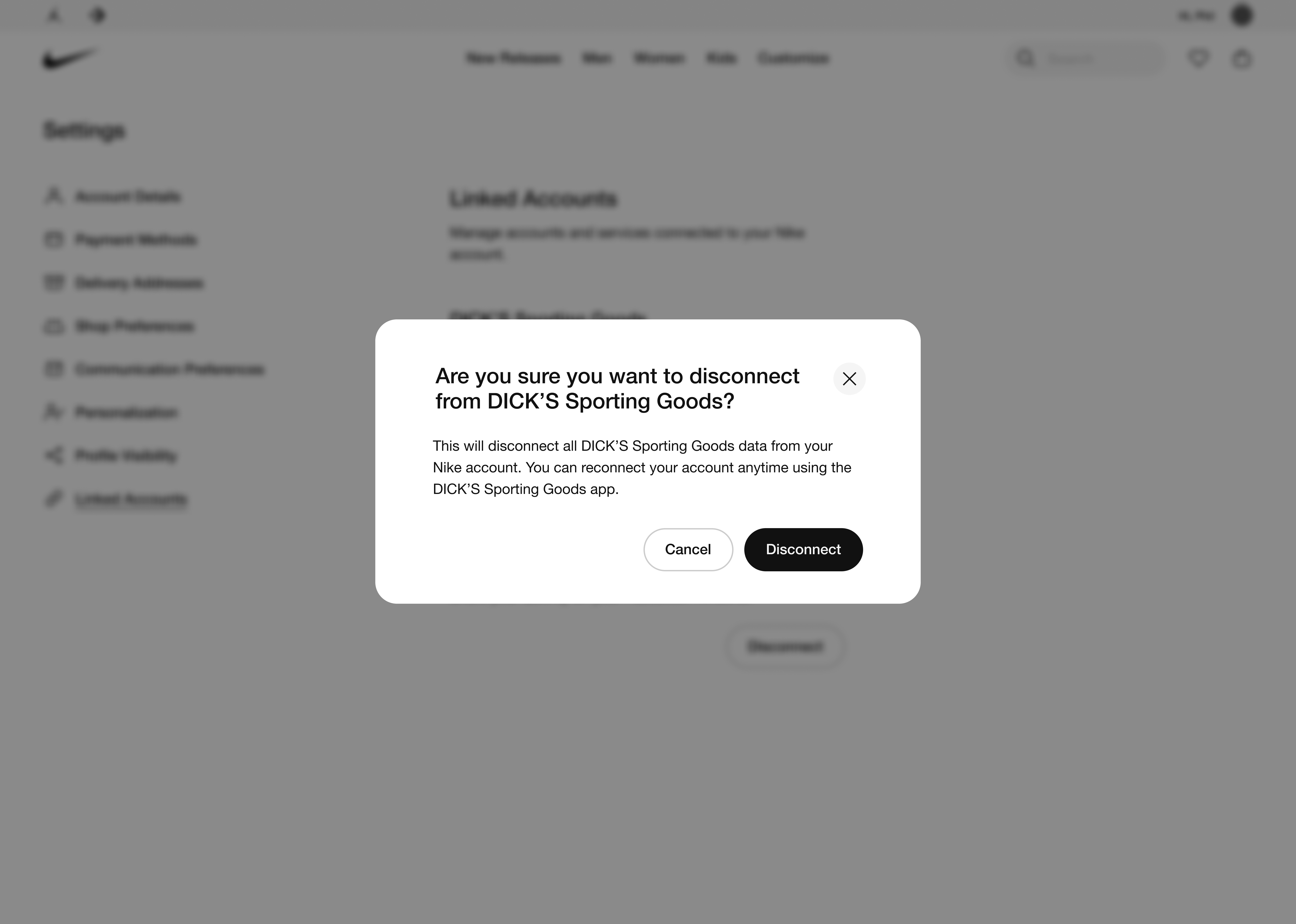
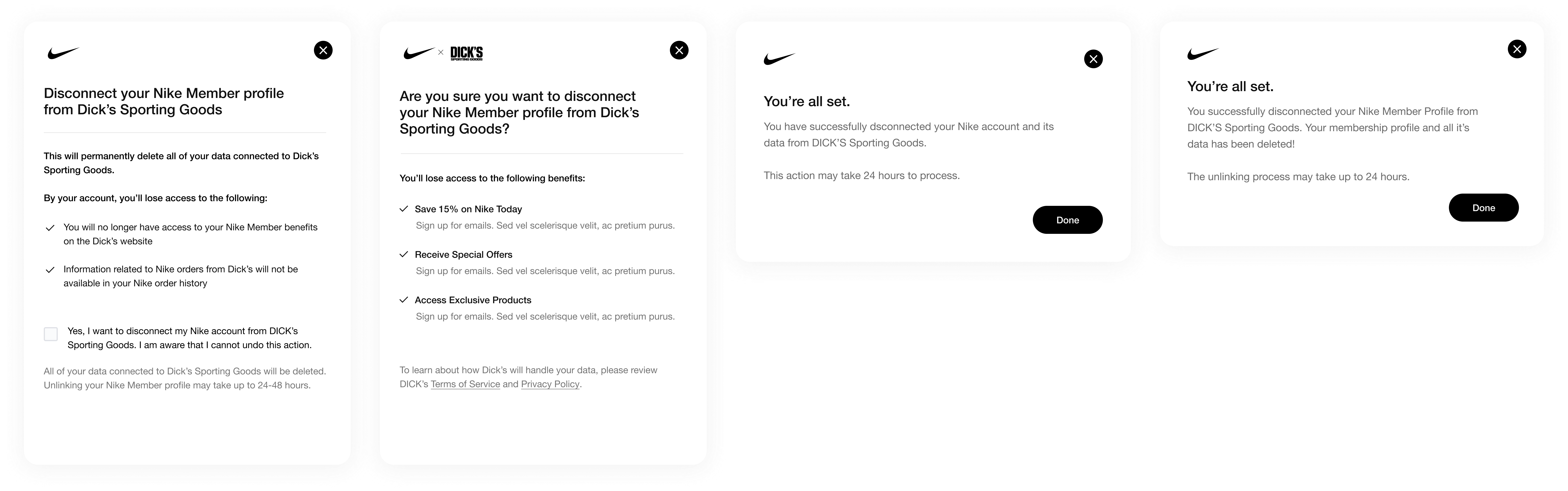
A confirmation prompt for users to confirm the action of disconnecting a Nike Partner and all of their data from their Nike Membership. Our team ensured that the copywriting was informative of data privacy for all users.
Disconnect Prompt ―
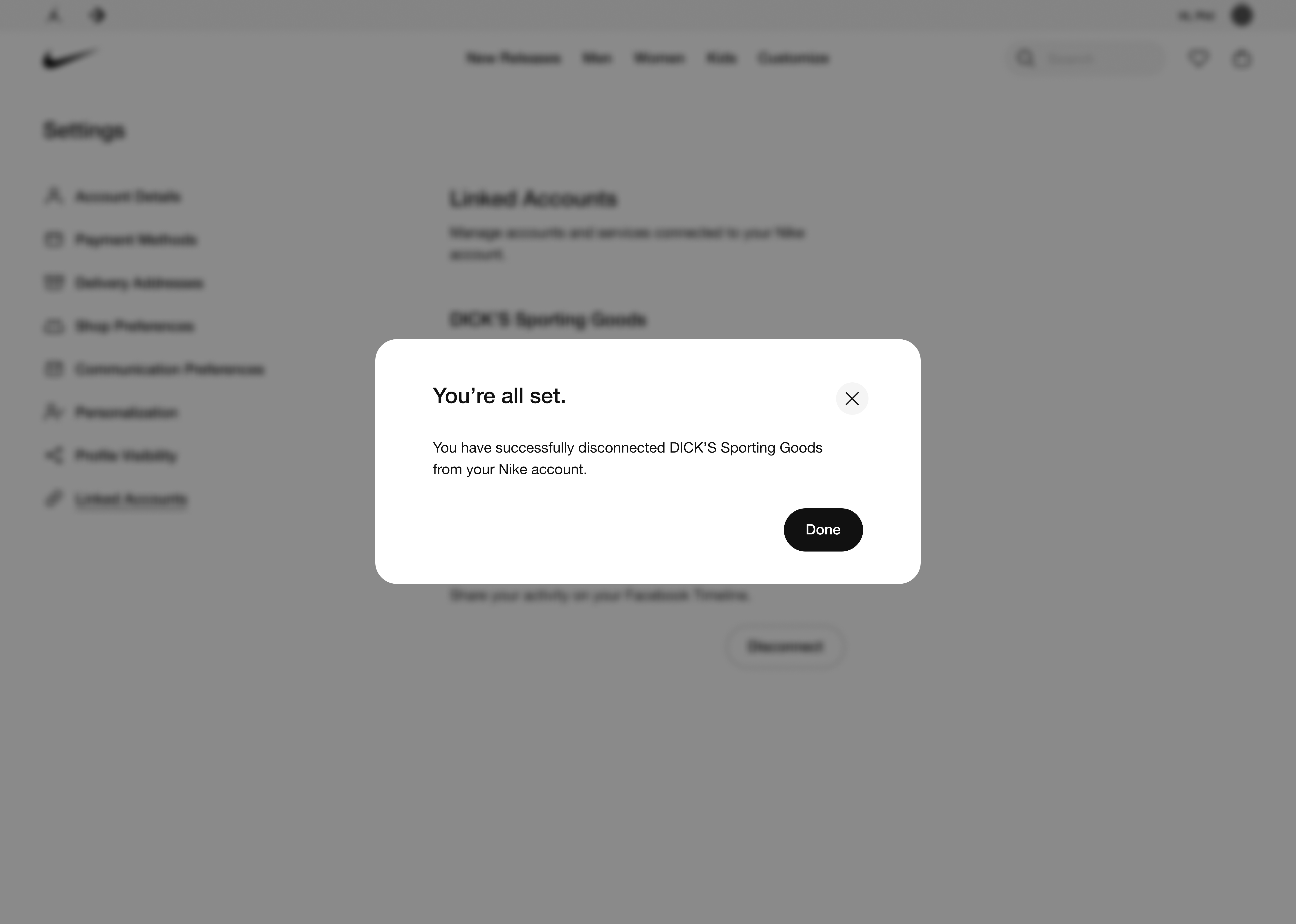
A success confirmation modal appears when a user has successfully disconnected a Nike partner or service from their membership account along with their data.
Partner Disconnect Confirmation ―
03 • Legal Review
Copywriting Explorations Examining copywriting and informing users on how their account and data will be disconnected from a Nike partner to provide full data privacy transparency for consumers.
For disconnecting consumers' Nike Membership from DICK'S Sporting Goods, various iterations were designed to show consumers the benefits that they are losing by disconnecting. Working with copywriters, senior designers, and marketers help reduce the amount friction and simplify the unlinking experience.
04 • Research
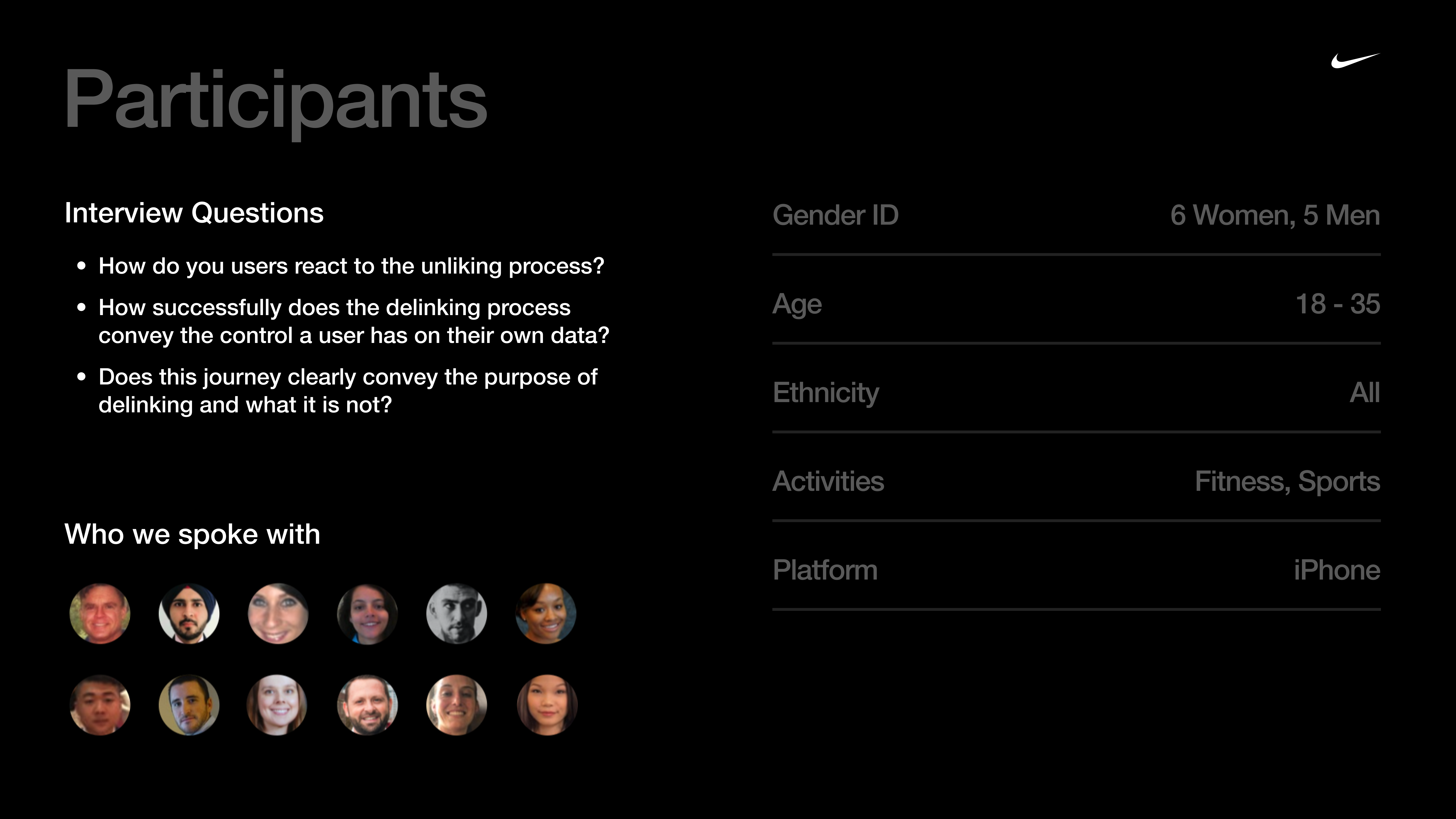
Overview 1-hr remote interviews were conducted with 11 consumers in LA and NY. These consumers were males & female iPhone users from the ages of 18-35 that regularly browse/purchase athletic apparel/footwear online and consistently active in sports and fitness. During these sessions we focused on Linking / Unlinking Accounts.
Account Linking / Unlinking usability testing involved Nike's current Partner DICK'S Sporting Goods (DSG) to prep for late 2021 release. Participants began by sharing their past experiences linking accounts, reasons as to why they would want to do this, and what benefits they would expect from doing so. Then, using prototypes of the DSG App, they were prompted to connect their Nike & DSG accounts. After completing several non-related tasks, participants were then prompted to unlink their Nike & DSG accounts using prototypes.
Research Approach ―
Consumers are okay with, and almost have the expectation that their data will be shared between Nike & DSG, but small assurances and clarification go a long way.
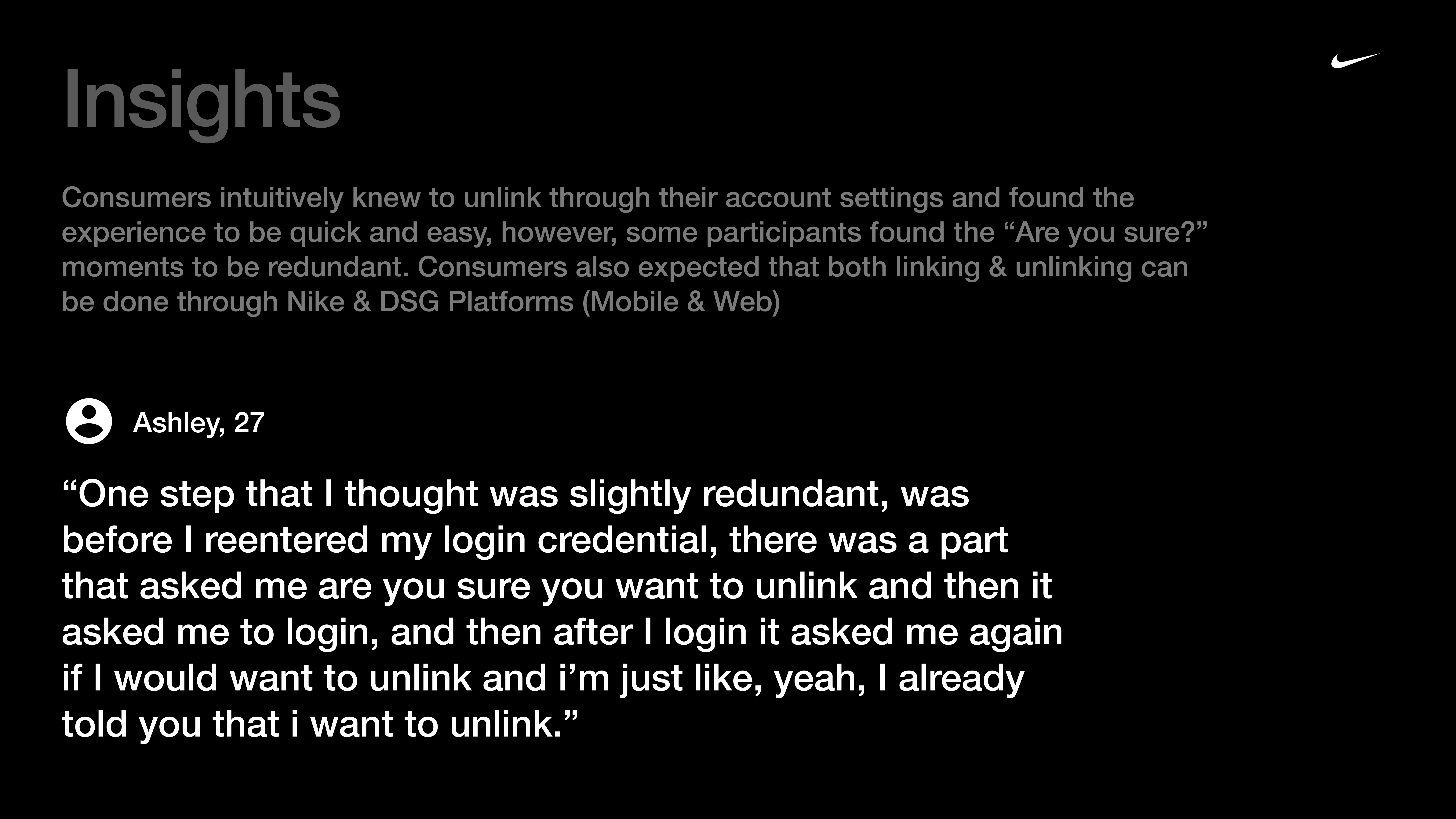
▹ Consumers expect that Nike & DSG would stop sharing data post unlinking, however, they don’t have an issue with continued access to historical data from when the accounts were linked. ▹ Most consumers felt confident that they successfully unlinked accounts, and would expect some lag time before data sharing ceases. (Expected lag times ranged from 1-2 hours to 30 days) ▹ Consumers were unable to determine the difference between Disconnect & Unlink, and most participants believed this language to mean the same thing.
Recommendations ▹ Provide consumers a path to link accounts through account settings, similar to the connected accounts location used for unlinking.
▹ Update the copy used to describe the benefits of connected membership to give consumers more clarity around what benefits they can expect from connected membership.
Insights & Recommendations ―
05 • Production
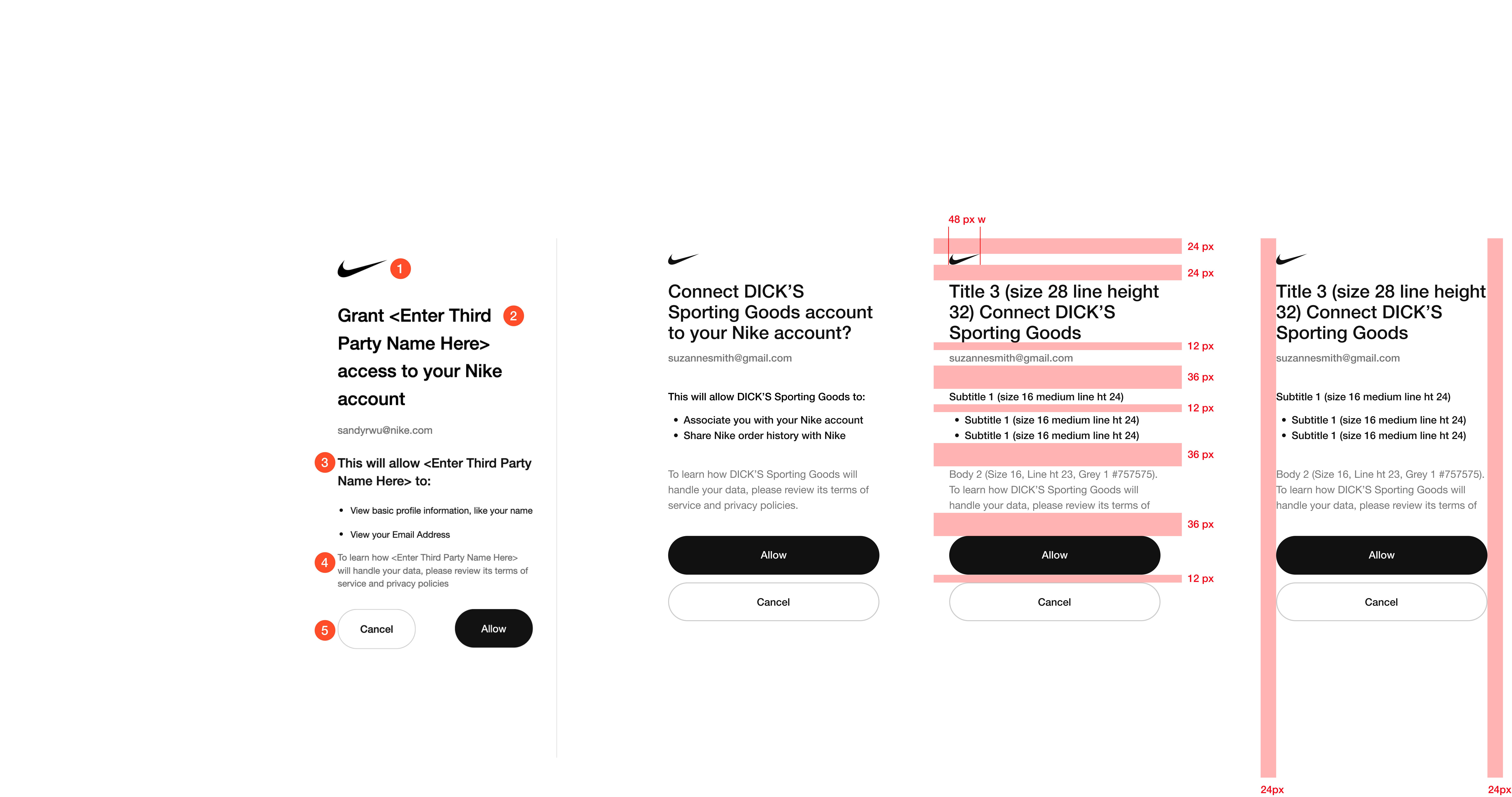
4-Point Grid, Layout, & Spacing Nike's design system was implemented to speed up the design and development process that allows for responsive scrolling.
To meet the stakeholder's deadline, I worked with engineers, developers, and Nike's Digital Design System team to align on margin, spacing, and responsive layout. Design reviews involved ensuring device responsiveness to provide the best user experience across all devices from mobile to desktop.
Product Development ―
In design reviews, I studied Nike's Digital Design System to add essential components, branding colors, and spacing before delivering to developers. As the Design System evolved, I need to continue to make changes to designs across all devices.
VGA Scopes ―
06 • Nike App
Membership Acquisition Growth As part of the Core Commerce Product Design Review (PDR), I worked on the official Nike App to find solutions for on-boarding, privacy settings, & improving shopping experiences. These designs were presented to VP's of Product Design and Senior Product Managers.
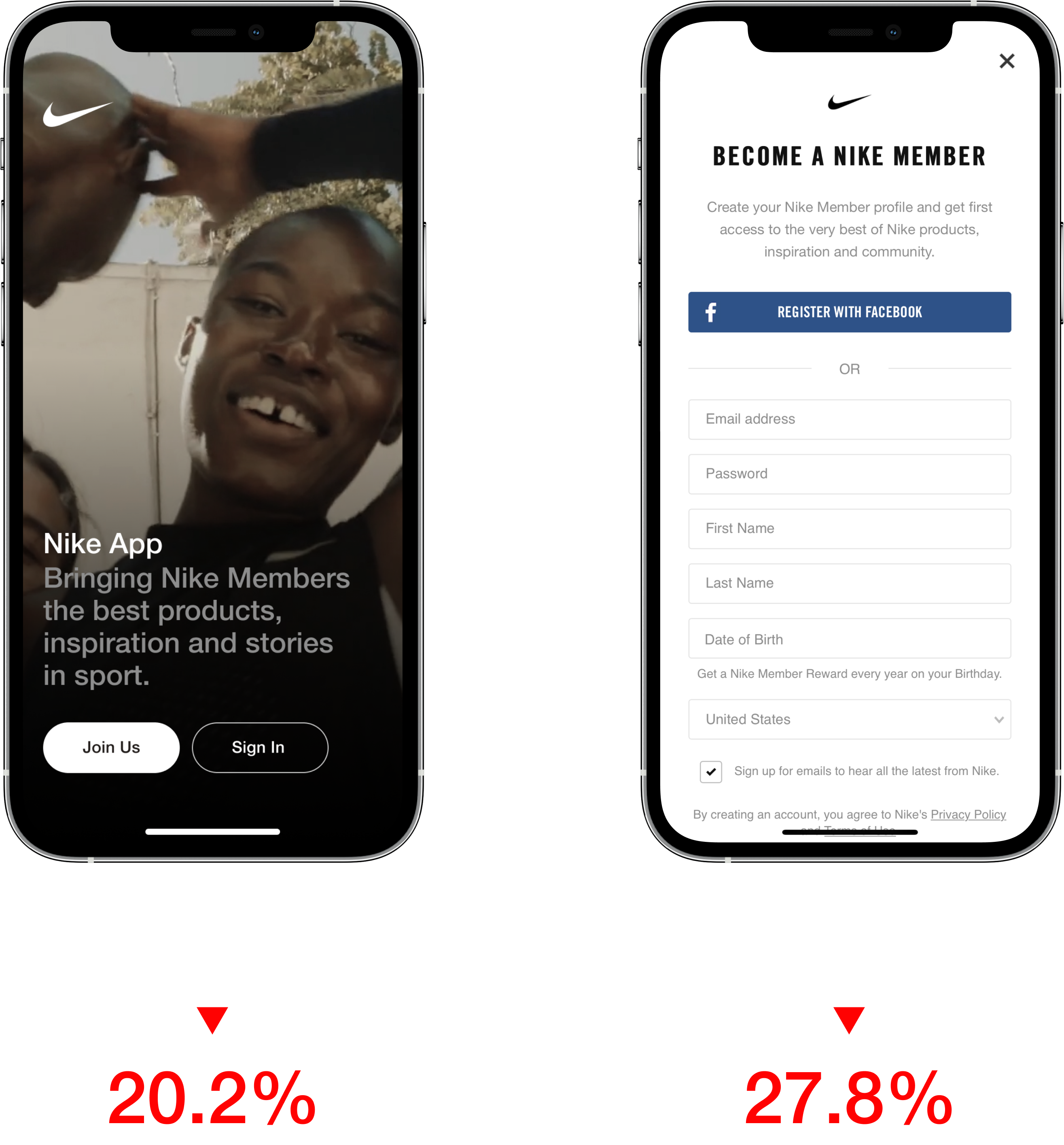
Nike has a high drop off rate from installing the app to creating account. There needed to be a way to reduce the drop off rate and increase membership acquisition. Does a lengthy registration process reduce membership acquisition? Do users prefer shopping instantly without signing in?
Problem Space ―
Allowing consumers to browse the store without requiring login will increase the number of consumers who engage on the Nike App. I've worked a new onboarding and registration process that makes creating an account faster and highlights membership benefits as users browse the store.
Opportunity Space ―
06 • Final Design
Deliverables
High-Fidelity Screens Interactive Prototype
Shipped! 🚀
Account Linking Settings — Disconnect
Creating a more personalized consumer experience so we can better understand and serve our Nike community. Connected Membership Accounts will move Nike past traditional retail offerings, such as offering discount codes, and into an expanded approach to reaching new consumers. Account Linking Settings is officially live on Nike.com, Nike App, & DICK's Sporting Goods App.
Disconnect DICK'S Sporting Goods Membership from your Nike Membership Account Remove connected accounts Manage Linked Accounts on Nike.com and view all of your exclusive membership benefits. When a partner is removed, all of your data will be unlinked.
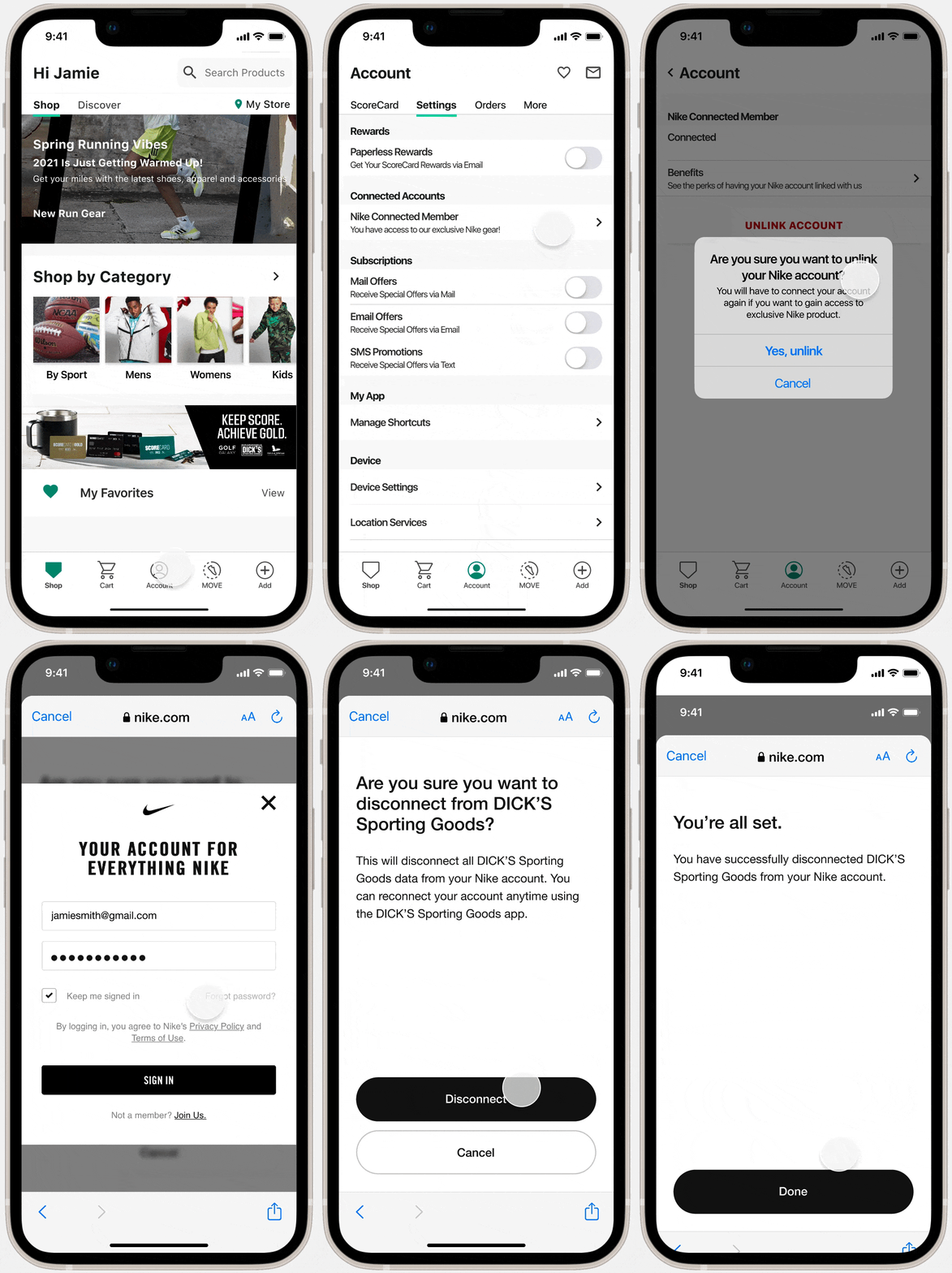
Unlink Nike Membership Account through the DICK'S Sporting Goods App Disconnect your account outside Nike.com Linked Accounts Settings You can now open the DICK'S Sporting Goods App and unlink your Nike Membership and all of your connected data through Account Settings.
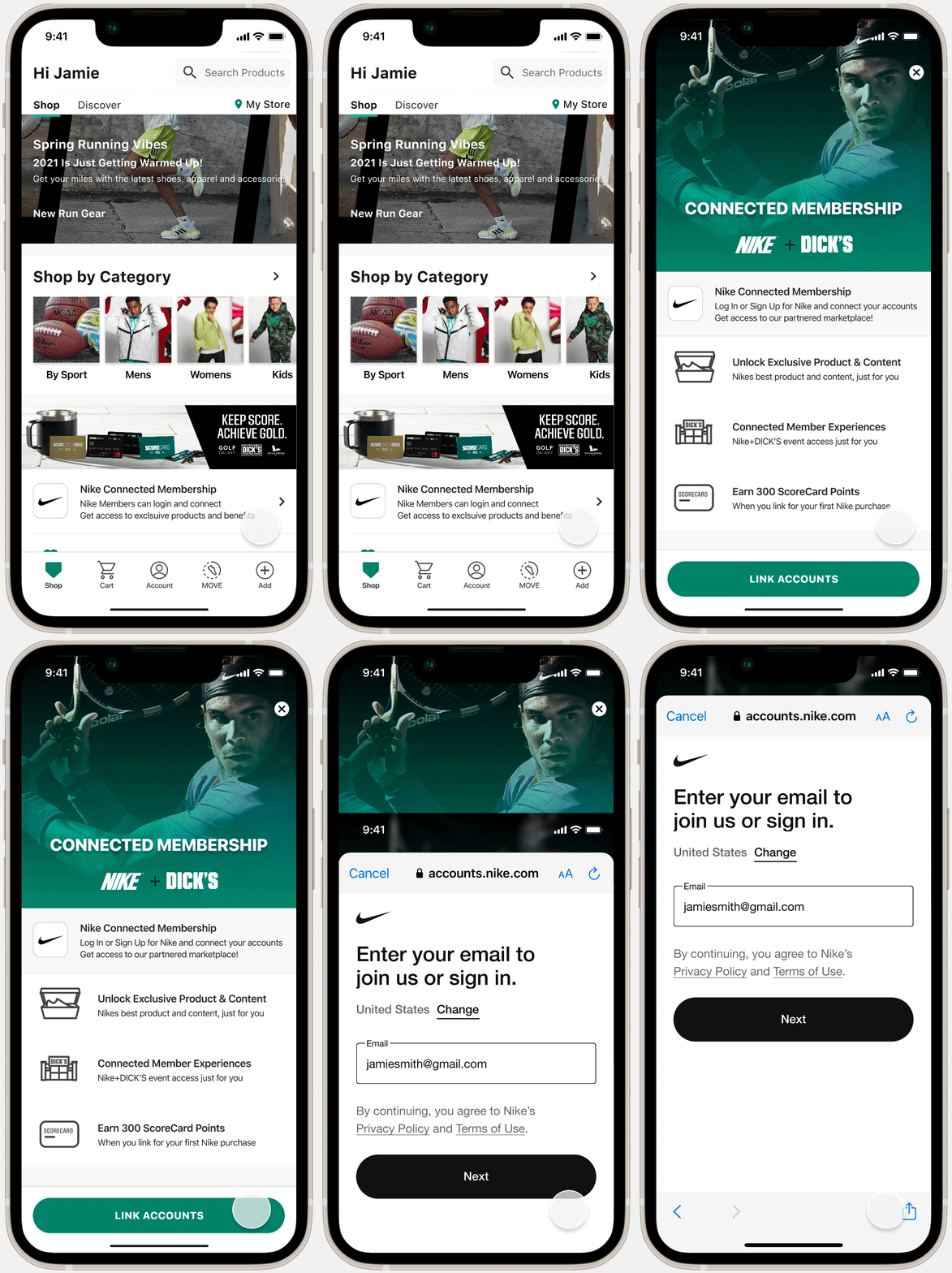
Link your Nike Membership with your DICK'S Sporting Goods Membership Sign In with your Nike Account to gain access to an exclusive marketplace Unlock exclusive content, special products, and earn points from your first Nike purchase.
Disconnect a Partner from your Nike Account Remove connected accounts Manage Linked Accounts on Nike.com and view all of your exclusive membership benefits. When a partner is removed, all of your data will be unlinked.
07 • Public Release
Overview
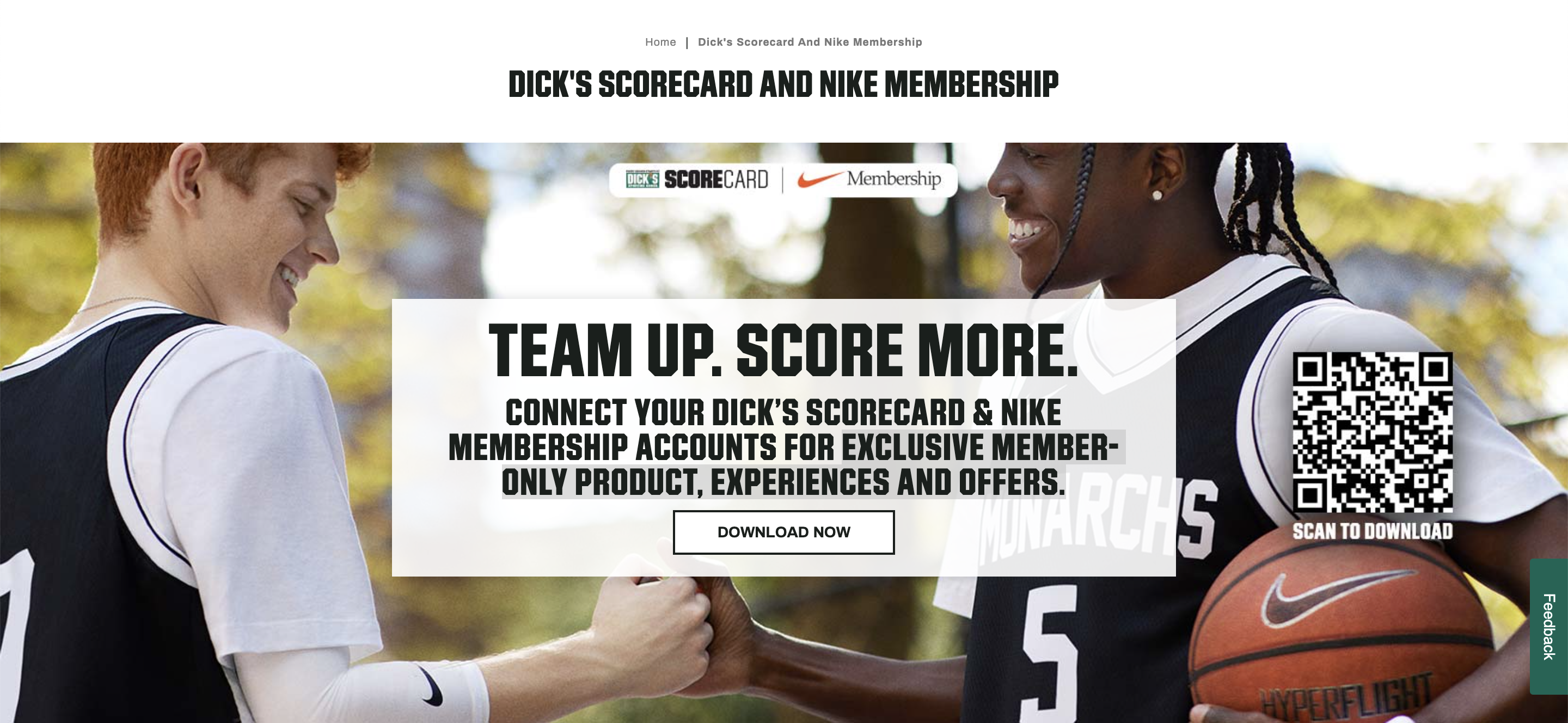
Nike's partnership with DICK'S Sporting Goods now allows consumers to link their DICK’S ScoreCard and Nike Membership through Account Linking to unlock exclusive content and benefits.
DICK’S Scorecard and Nike Membership
ScoreCard is the DICK’S Sporting Goods loyalty program applicable to DICK’S, Golf Galaxy, Field & Stream and Going, Going, Gone! Learn more at DICKS.com/ScoreCard.
By connecting your DICK’S ScoreCard and Nike Membership accounts, consumers will be able to gain access to member-only product, experiences and special offers.
08 • Conclusion
Designing for a large ecosystem. Nike is large and complex, learning their ecosystem and following the Nike Digital Design System was a priority when making design decisions. Every person has valuable knowledge to offer.
Working with Senior Product Designers, Developers, and Copywriters taught me how to ask better questions and take initiative. Each person has a critical role and has a wealth of knowledge to offer, so it's important to stay curious.
Knowing when to improvise I also managed to learn from the setup team how to design within constraints because not all situations are ideal.